Unlocking the Full Potential of Seamless Pattern Pretty Peonies 2 for Your Creative Projects
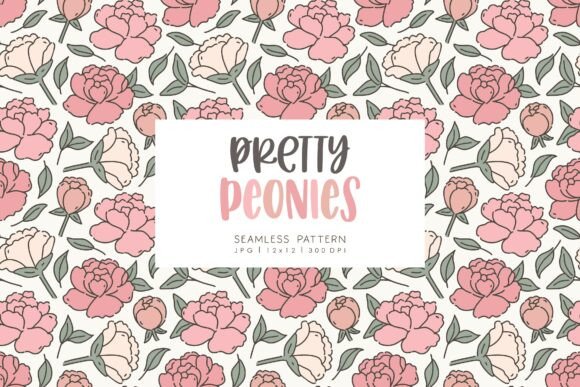
There is a distinct satisfaction in finding a digital asset that instantly elevates a design from ordinary to exceptional. Seamless Pattern Pretty Peonies 2 offers exactly that kind of versatility, providing a lush, floral backdrop that works across a surprising range of mediums. Whether you are a seasoned graphic designer crafting a brand identity or a hobbyist assembling a wedding invitation suite, this pack includes three high-resolution JPG files sized at 12×12 inches with a crisp 300 DPI. However, possessing high-quality assets is only half the battle; knowing how to integrate them effectively without falling into common technical traps is what separates amateur results from professional finishes.
Many creators rush into downloading and applying patterns like Seamless Pattern Pretty Peonies 2 without fully considering the technical requirements of their specific project. A frequent oversight involves resolution expectations. While 300 DPI is the gold standard for print, some users mistakenly assume this guarantees quality at any scale. If you attempt to stretch a 12×12 inch image to cover a large format, such as a decorated furniture piece or a wide wrapping paper roll, you may encounter pixelation. The better approach is to calculate your final output size before beginning. For larger surfaces, consider using the pattern as a repeating tile in your design software rather than stretching a single instance of the file. This maintains the sharpness of the peony details and ensures the texture remains crisp.
Navigating File Formats and Color Consistency
Another area where confusion often arises is the file format itself. This pack provides JPG files, which are universally compatible but operate differently than PNGs or vector formats. A common mistake is attempting to remove the background of a JPG to isolate the flowers for use on colored paper or transparent overlays. Because JPGs do not support transparency, users sometimes struggle with white halos or awkward edges when trying to cut out elements. Instead of fighting the file type, embrace the seamless nature of the design. Use the pattern as a complete background for blog designs, website headers, or scrapbooking layouts where the full floral field adds depth. If you need isolated elements, look for companion clipart packs, or use the pattern specifically for projects like decoupage and packaging where the continuous print is the intended aesthetic.
Color management is equally critical, yet frequently overlooked. What you see on your calibrated monitor may not match the final printed product, especially when creating items like birth announcements, business cards, or planner stickers. Many beginners skip the step of converting their document color mode from RGB to CMYK before sending files to a professional printer. This can result in muted pinks and dull greens, stripping the vibrancy from the peonies. To avoid this disappointment, always request a proof from your printer if possible, or print a small test sheet on the actual material you intend to use. This simple check saves money and prevents the frustration of reprinting an entire batch of invitations or tags.
Maximizing Versatility Across Different Mediums
The true power of Seamless Pattern Pretty Peonies 2 lies in its adaptability, but this requires a shift in mindset regarding application. For digital scrapbooking and site designs, the workflow is straightforward: import, layer, and export. However, physical applications like hardcover books, jewelry, or handmade stationery demand more preparation. A typical error here is neglecting the substrate. Applying a delicate floral pattern to a dark or textured surface without a base layer can obscure the design. When making DIY project items like decorated furniture or custom packaging, always prime your surface or print the pattern onto high-quality, opaque sticker paper or transfer media first. This ensures the soft hues of the peonies pop against the material rather than getting lost in it.
Furthermore, consider the scale of the pattern relative to the object. Using a large-scale floral print on small items like place cards or tags can make the design feel cluttered or cut off awkwardly. Conversely, using it on a large wall mural might make the flowers appear too sparse. Before committing, create a mockup. Most design software allows you to preview the repeat. Adjust the scale until the flowers feel balanced within the boundaries of your specific item, whether it is a logo mark or a full party backdrop. This attention to proportion enhances the perceived value of your final product.
Legal and Commercial Considerations for Entrepreneurs
For freelancers and small business owners, understanding the licensing terms is non-negotiable. While this pack is perfect for commercial ventures like selling crafts for weddings, birthdays, and parties, there are boundaries. A common misunderstanding is assuming "commercial use" means you can resell the digital file itself. You cannot redistribute the JPGs as your own stock photography or include them in a digital template pack where the end user can extract the raw image. The value you add must come from your unique design composition—such as a finished invitation, a printed journal, or a branded package. Respecting these limits protects your business from legal issues and supports the original artist.
Additionally, when using these patterns for client work, such as website designs or logos, ensure you have the right to embed the image permanently. Some licenses restrict the number of impressions or require an extended license for mass-market products. Always read the specific terms associated with your download. If you are creating a logo, be aware that using a stock pattern as the primary mark can limit trademark potential, as the image is not exclusive to your brand. A smarter strategy is to use Seamless Pattern Pretty Peonies 2 as a supporting element in the brand suite—on business cards, letterheads, or social media graphics—while keeping the core logo distinct and custom.
Final Checks Before You Create
Before you dive into your next creative session, take a moment to audit your setup. Verify that your software supports high-resolution JPGs without compressing them upon import. Check that your cutting machines, if used for planner stickers or cards, are calibrated for the thickness of the printed media. Remember, no physical items will be shipped; this is a purely digital download, so immediate access is yours, but the responsibility for quality control rests with you. By anticipating these details and avoiding the pitfalls of improper scaling, color mismanagement, and license misuse, you can harness the full beauty of this floral collection. With careful planning, Seamless Pattern Pretty Peonies 2 becomes more than just a pretty image; it becomes a reliable foundation for professional, polished, and heartfelt creations.